NotebookLM (now Gemini Notebook): Features and Use Cases

Key points at a glance
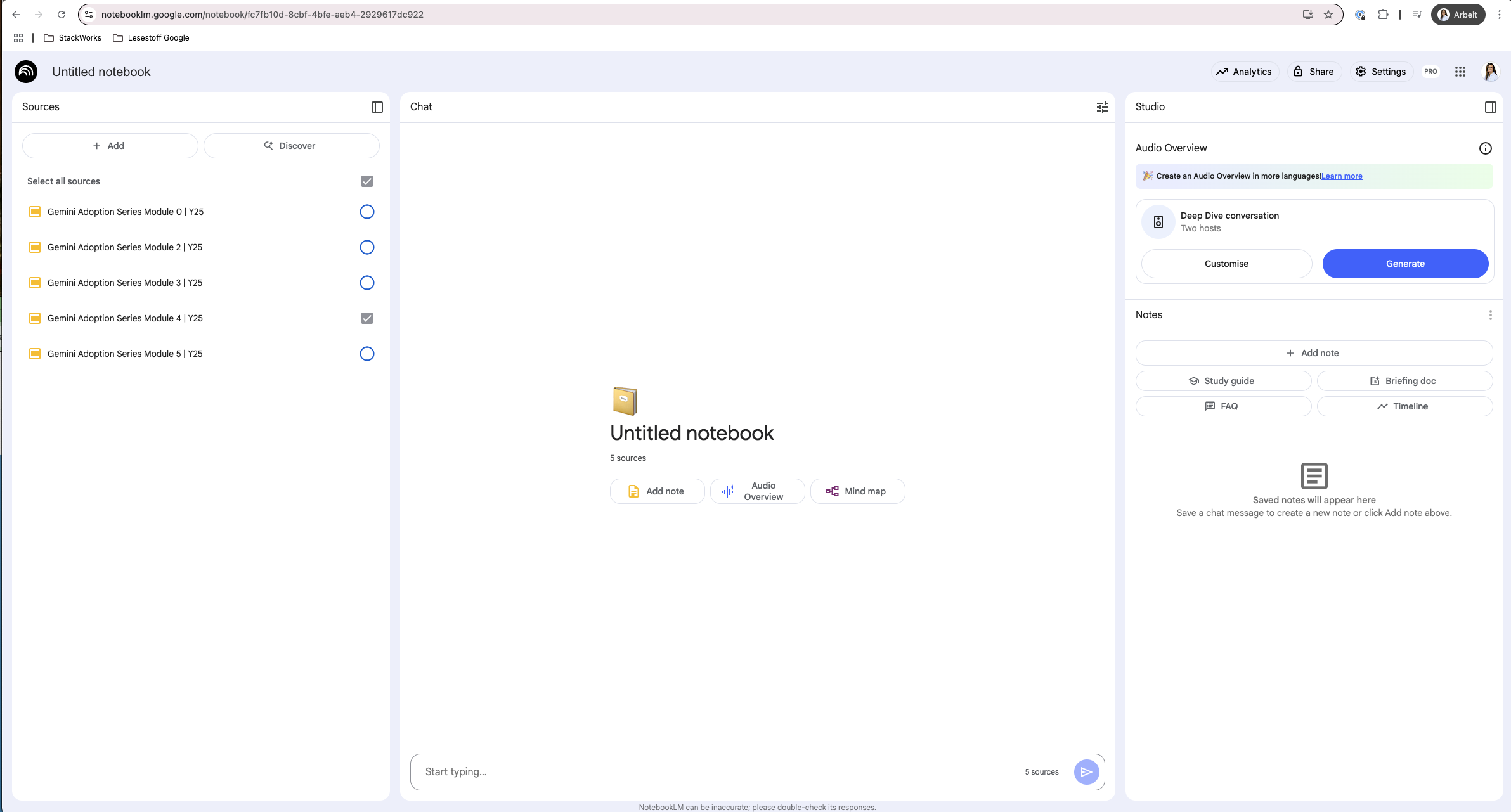
- Using Your Own Sources as a Basis: Gemini Notebook (formerly NotebookLM) answers questions based on your uploads (text, audio, web pages, PDFs, Google Docs, Slides, YouTube links), with up to 50 or 300 sources per notebook, depending on your license.
- Answers with References: Each answer includes a footnote referencing the original source; however, it is still your responsibility to verify the information.
- Privacy depends on the account type: For Workspace accounts, uploads, questions, and answers are not reviewed by humans and are not used to train AI models.
What is NotebookLM (now Gemini Notebook), and what can it do?
Gemini Notebook is an AI-powered research and writing assistant from Google that is based on Gemini and works with the content you upload. Instead of general answers, you get results from your own documents: websites, PDFs, presentations, audio files, or YouTube videos.
Unlike a general-purpose chatbot, NotebookLM is designed to work with its own sources.
- Aggregating and analyzing data: Notebooks can incorporate many sources. The number of sources and the amount of usage your account allows depends on your plan: Starting in September 2026, Google has switched the limits for personal accounts to flexible, compute-based limits.
- Chat with the sources: You ask questions of all the sources at the same time and receive answers that include quotes from the original text.
- Content Creation: Briefings, outlines, FAQs, study guides, and audio summaries are quickly produced based on your sources.
- Record your findings: You can save important answers as notes.
- Collaborate: Notebooks can be shared and edited together.
How do sources and citations work?
Every answer in NotebookLM (now Gemini Notebook) includes footnotes, and a single click takes you directly to the corresponding section in the original document. This allows you to verify each piece of information immediately, reducing the risk of incorrect answers. However, it cannot be completely ruled out: Google itself points out that NotebookLM can make mistakes. Therefore, for important statements, open the footnote and check the original source.
What are audio overviews and other output formats?
Audio Overviews transform your sources into a podcast conversation with a single click, in which two AI voices discuss the key points. This is helpful when you don’t have time to read a 50-page report. A new feature is the interactive component: You can join the conversation using voice commands, ask follow-up questions, or delve deeper into specific topics.
Other output formats:
- Mind maps for a visual overview
- FAQs and briefings, such as for clients
- Flashcards
- Presentations
- Infographics
- Video summaries
(as of October 2026).
How do I work in a team with NotebookLM?
Notebooks can be shared within a team, either for collaborative editing or simply as a source of information. Colleagues can be invited as “editors” to work on the notebook together.
With the “Chat only” option, other people can ask questions about your notebook but cannot view the original source documents. This is useful when you want to share insights but keep contracts or raw data internal. Typical uses include onboarding, training, and product documentation.
What do companies use NotebookLM for?
NotebookLM is ideal for any situation where numerous documents need to be consolidated into a single response. The following scenarios are examples, not documented customer cases.
- Sales: Product information, price lists, case studies, and meeting notes serve as a central knowledge base from which customer-specific documents can be derived.
- Customer Service: Manuals, frequently asked questions, and ticket histories are linked together so that inquiries can be answered more quickly and thoroughly.
- Research and Development: Organizing studies, patents, and experimental documentation, and identifying connections.
- Audit Preparation: Upload process descriptions, guidelines, and training records, and quickly locate the relevant sections when questions arise.
- Executives: Summarize market analyses, reports, and notes concisely before important meetings, citing the sources.
- Market and Industry Knowledge: Analyze expert articles, studies, and news feeds, and summarize trends.
- Human Resources Development: Manage training materials, competency profiles, and continuing education opportunities in a clear and organized manner.
Our tip: Choose a current project, upload the documents as sources, and have the system generate an audio overview. If you already use Google Workspace and do a lot of research, NotebookLM is especially worthwhile. This topic was also covered in Module 5 of our “Gemini Adoption Series.”
Conclusion: Who Should Consider NotebookLM?
NotebookLM—known as Gemini Notebook since July 2026—is a valuable tool for teams that analyze large volumes of documents and need answers backed by evidence. It answers questions using your own sources, cites the original source, and generates briefings, audio overviews, and other formats based on that information.
Three points determine the benefits:
- The Account: For business data, NotebookLM belongs in a Workspace account because uploads, questions, and answers there are neither reviewed by humans nor used to train AI models.
- Verification: Footnotes facilitate the review process but do not replace it. Important statements belong in the original text.
- Limits: The number of sources and the amount of usage allowed depend on your account and plan and have recently changed.
If you're already using Google Workspace, you can try out NotebookLM with minimal effort. We're happy to assist you with selection, permission settings, and implementation.
Testing the NotebookLM (now Gemini Notebook) as a team
About StackWorks
As a certified partner for Google Cloud and Microsoft, we help Swiss companies build modern work environments and implement cloud, AI, and AI agents—such as NotebookLM in Google Workspace.
Frequently Asked Questions About NotebookLM?
Is NotebookLM now called Gemini Notebook?
Yes. Google renamed NotebookLM to Gemini Notebook on July 16, 2026. It remains the same standalone product and will work more closely with the Gemini app and Google Search going forward.
What types of files can I upload to NotebookLM?
In NotebookLM, you can upload PDFs, web pages, YouTube videos, audio files, Google Docs, and Google Slides. The number of sources per notebook depends on your account and plan.
How do I know if an answer is correct?
Every answer from NotebookLM (now Gemini Notebook) includes a footnote linking to the original source, which can be opened with a click. However, Google notes that NotebookLM may contain errors. Therefore, it is advisable to verify important statements in the original source.
Do I need Google Workspace for this?
No, NotebookLM also works with a personal Google account (Google Help). For business data, we recommend using a Workspace account, because that is the only option where protection against human review and AI training applies without exception.